3 minutes reading time
(537 words)
Archives and File Groups in the App-V Scripts Folder

Sometimes it is necessary to be able to place whole file groups, directories or developer folders in the “Scripts” folder within an App-V package. These could then, for example, be copied via the AddPackage trigger prior to the start of the application during the installation of the package onto the computer. This blog shows a possibility for doing so using a VBS script as a basis, which triggers the installation and unpacks the archive.
The file group is compressed with the installation script in the archive and decompressed with a special VB script in the Scripts directory. The VB script additionally executes the actual installer for the archive group. Copy commands or installation instructions for MSI packages can be contained here, for example if a driver via a developer package should be installed.
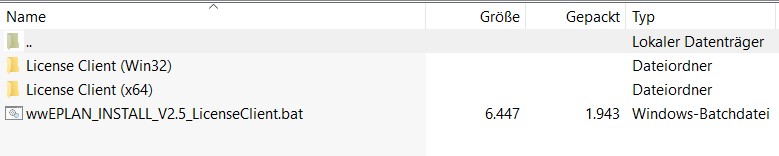
1. Compress the folder with the file group and the installation procedure, which could be a batch (CMD script) for example.
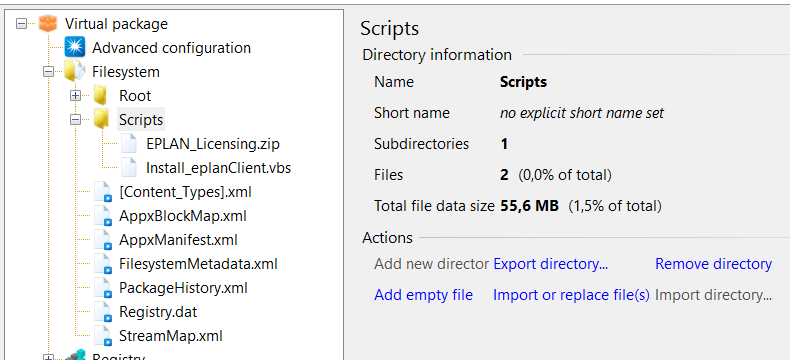
2. Deposit the packages and the process file (VBS) into the Scripts folder. This can be done using the Edit mode with the sequencer or, like in the following screenshot, with the Application Virtualization Explorer from Gridmetric.
The script unpacks the archive and completes the installation tasks. In the header of the script the frame parameters must be entered.
The name of the archive to be unpacked in the Script folder must be set in the installation file. This archive name will be sought in the App-V Scripts folder.
ZipArchiv = "archiv.zip"
Now define a temporary folder. The archive will be unpacked here. The name of the temporary folder will be created under %temp%\Foldername. In the system context this is C:\Windows\temp:
TempFolder = "tempinst" 'extract here
Set the name of the installation file (in the archive) in the VBS script. This is started with “cmd.exe /c” after the package is extracted. In this case, cmd.exe /c Install.cmd:
ZinstallBatch = Install.cmd”
' The archive will be copied from the “Scripts” directory
' into the Temp directory and unpacked there
' Thereafter a Batch script will start that installs the files
' Andreas Nick 2016
ZipArchiv = "archiv.zip"
TempFolder = "tempinst" 'extract here
ZInstallBatch = Install.cmd”

Set wshShell = CreateObject( "WScript.Shell" )
Set wshSystemEnv = wshShell.Environment( "SYSTEM" )
set fso = CreateObject("Scripting.FileSystemObject")
'Get Environment
Temp = wshShell.ExpandEnvironmentStrings( wshSystemEnv( "TEMP" ))
CurrentDirectory = fso.GetAbsolutePathName(".")
ArchivePath = CurrentDirectory & "\" & ZipArchiv
Set wshSystemEnv = Nothing
Set wshShell     = Nothing
Set fso       = Nothing
'Extract Archive
ZipFile=ArchivePath
wscript.echo  "ZIP:" &  ZipFile
ExtractTo = temp & "\" & TempFolder
Set fso = CreateObject("Scripting.FileSystemObject")
If Not fso.FolderExists(Temp) Then
    fso.CreateFolder(Temp)
End If
fso.CopyFile ZipFile, temp & "\"
If Not fso.FolderExists(ExtractTo) Then
    fso.CreateFolder(ExtractTo)
End If
'Extract
sourceFile = fso.GetAbsolutePathName(temp & ZipArchiv)
destFolder = fso.GetAbsolutePathName(ExtractTo)

Set objShell = CreateObject("Shell.Application")
Set FilesInZip=objShell.NameSpace(sourceFile).Items()
objShell.NameSpace(destFolder).copyHere FilesInZip, 16

'Execute installer
Set WshShell = WScript.CreateObject("WScript.Shell")
cmdpath = ExtractTo & "\" & ZInstallBatch
wscript.echo cmdpath
Wshshell.Run "%comspec% /c " & cmdpath, 0, True
fso.DeleteFolder(ExtractTo)
fso.DeleteFile(temp & "\" & ZipArchiv)
Set WshShell= Nothing
Set fso = Nothing
Set objShell = Nothing
Set FilesInZip = Nothing
To finish, the script must go in the DeploymentConfig.xml.
    < MachineScripts>
      < AddPackage>
        < Path>CMD.EXE
        < Arguments>/c cscript.exe
			 [{AppVPackageRoot}]\..\Scripts\Install.vbs
        < Wait RollbackOnError="true" Timeout="300" />
      < /AddPackage>
    < /MachineScripts>
@nickinformation Tweets

AppX
#PowerShell
Generator
MSI
PSConftris
Registry Staging
SQL Server Management Studio
AppV
Shortcut
powershell
Report
SQL Server Management Studio 2016
powersehll
AppV Server
tool
XenDesktop
Isolation Groups
Clean
automatic
Trigger
SSMS
Edge Chromium
appv
Keyboard
Windows application Cttune.exe
app-v 5
EventLog
ADC
PowerShell Gallery
Nativ OTP
MSIX
Certificates
Citrix
Editor
ConceptOne
Edge
workflow process
app-v
winget
XenApp
XenDesktop
Gateway
Server 2019
Local Applications
Connection Groups
Cat
Links
data deduplication
EventID
Powershell
Software defined storage
content
Recipe
pdf
Events
App-V
MSP
Patch
Server 2022
CA
ClearType function
benchmark
Code Signing
Comments 4
Hi, nice bloggpost.
There is actually a way to create folders directly in the script folder during seq. with a little hack I found out some while ago. It's explained in my blog https://how2appvirtualize.blogspot.com/2019/01/how-to-use-dynamic-scripting-in-your.html?m=1
Good read!
https://how2appvirtualize.blogspot.com/2019/01/how-to-use-dynamic-scripting-in-your.html?m=1
Yes, that is possible. You can simply paste the calls into the installation script :-)
Thank you, after that I have searched. Is it possible to start multiple installation scripts?